|
View it now on HighEnd3D.com!! |

|
iMage: Image Manipulation in Maya via Photoshop |
|
· Image Manipulation via Photoshop Droplets · File Back-Up of selected texture nodes · Texture Refresh button for selected texture nodes · Locates and works on your textures wherever they are · High-Design Interface · In-App Pop-Up Documentation |
iMage Features |
|
Current Version: 1.1 |
|
iMage was designed with one goal in mind: ‘Edit textures in Maya with Photoshop, and make it as easy as possible.’
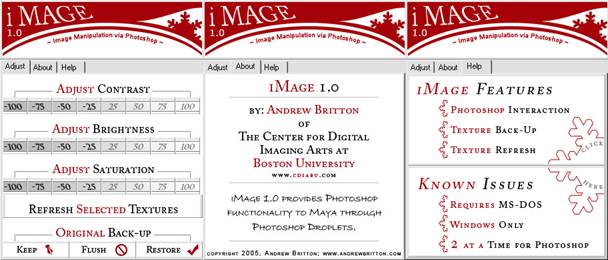
Photoshop Automation- With this task in mind, iMage 1.0 was created. Any Maya file texture node can be edited in Photoshop by way of the iMage interface. Each of the numbered buttons in the left panel control Photoshop droplets that alter the texture’s contrast, brightness or saturation by the desired amount. To add further ease to the process, multiple textures can be processed at once!
Texture File Back-Up- Because Photoshop will edit and save over the existing texture, a system of file back-up was devised to protect original files and still work on the loaded texture. Keep– This creates back-up copies of your textures. Flush– Overwrites the back-up with the working version Restore– Overwrites the working version with the back-up version and deletes the back-up version.
Texture Refresh- Select any file texture node(s) and hit the Refresh Selected Textures button. In seconds your textures will update with the last made changes. In order to make this update happen everytime, Maya calls a BATCH file that deletes the .mayaSwatch for each selected texture.
Locates and Works on Textures Wherever They Are- Through advanced MEL operations, iMage searches the paths for each selected texture and operates on your textures in their respective locations. No Requirement to move your textures to new or foreign directories.
High-Design Interface- iMage is designed to be easily legible. Extensive time was devoted to top-tier interface design, combining MEL UI and Photoshop generated imagery for icons. The result is a clean and easy-to-read interface.
In-App Pop-Up Documentation- The right panel (from the illustration above) shows two buttons: one that outlines the current feature set of iMage and one that outlines the current known issues or bugs with iMage.
View the ReadMe file here- Follow the link my friends... |

|
iMage Summary |
|
To contact us: |
|
E-mail: mailBox@andrewbritton.com |

|
Main | Computer Graphics | Contact Us | About Us | Related Links | Portfolio | Stories | Students | Legal |